|
LaunchBox for Windows 13.27
|
|
A big level up for achievements, saves, setup, and more
|
|
|
13.27 is one of those updates where a lot of familiar parts of LaunchBox just got smarter, safer, and smoother to use. Whether you're chasing achievements, protecting saves, setting up a new library, or just browsing from the couch, there's something here for you.
|
|
Here's a look at what's new.
|
|
|
|
|
RetroAchievements Gets a Major Upgrade
|
|
Track progress faster, browse achievements easier, and show the stats you care about
|
|
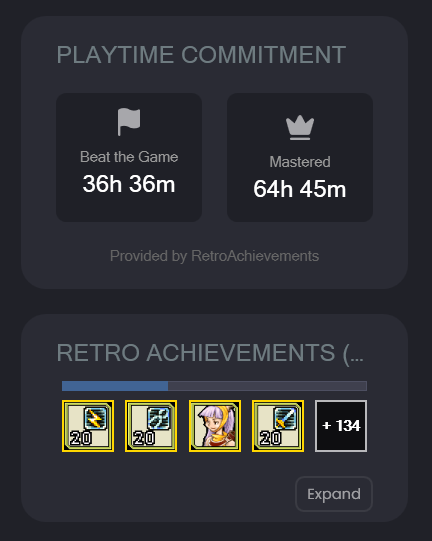
Game Details can now show Time to Beat and Time to Master stats, so you know exactly what you're signing up for before you jump in. A light achievement hunt or a full mastery run? Now you can tell at a glance.
|
|
In Big Box, achievement lists are now filterable, making it easy to narrow things down from the couch without scrolling through everything at once. RetroAchievements profile pages have also been revamped in both LaunchBox and Big Box, loading much faster and showing more information.
|
|
You can now also configure RetroAchievements stats in the top menu bar. Right-click to choose what you want displayed: Retro Points, Hardcore Points, Games Beaten, Site Rank, and more. Badge support has been added for WiiWare games too, making it easier to spot RetroAchievements-supported titles right in your library.
|
|
|
|
|
|
|
Save Management Gets a Serious Upgrade
|
|
Your progress, protected
|
|
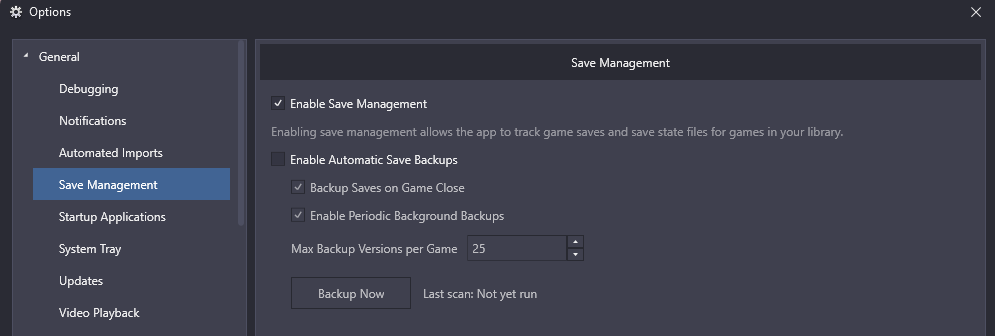
Save Management is now significantly more powerful. You get automatic backups, backup-on-close options, backup limits, manual backup scans, save version history, labels, and grouped saves. Testing emulator settings, switching cores, or deep into a long RPG run? LaunchBox now gives you the tools to keep your progress safe no matter what.
|
|
The big addition: expanded support for Dolphin and PCSX2. Your saves across Nintendo GameCube, Nintendo Wii, Nintendo WiiWare, and Sony PlayStation 2 can now be tracked, backed up, labeled, and restored directly through LaunchBox in ways that weren't previously possible.
|
|
Labels let you add context beyond just the date and time. Tag your original "Childhood Save" dumped from real hardware. Grouped saves keep related saves together, perfect for long RPGs, challenge runs, or games where you want to track multiple milestones.
|
⚠️ Updating from an older version? If you already use LaunchBox Save Management, we recommend reading the 13.27 Save Management Migration Guide before making major changes to your setup. |
|
|
|
|
|
|
Setup and Imports Are Easier to Follow
|
|
Less mystery, more clarity
|
|
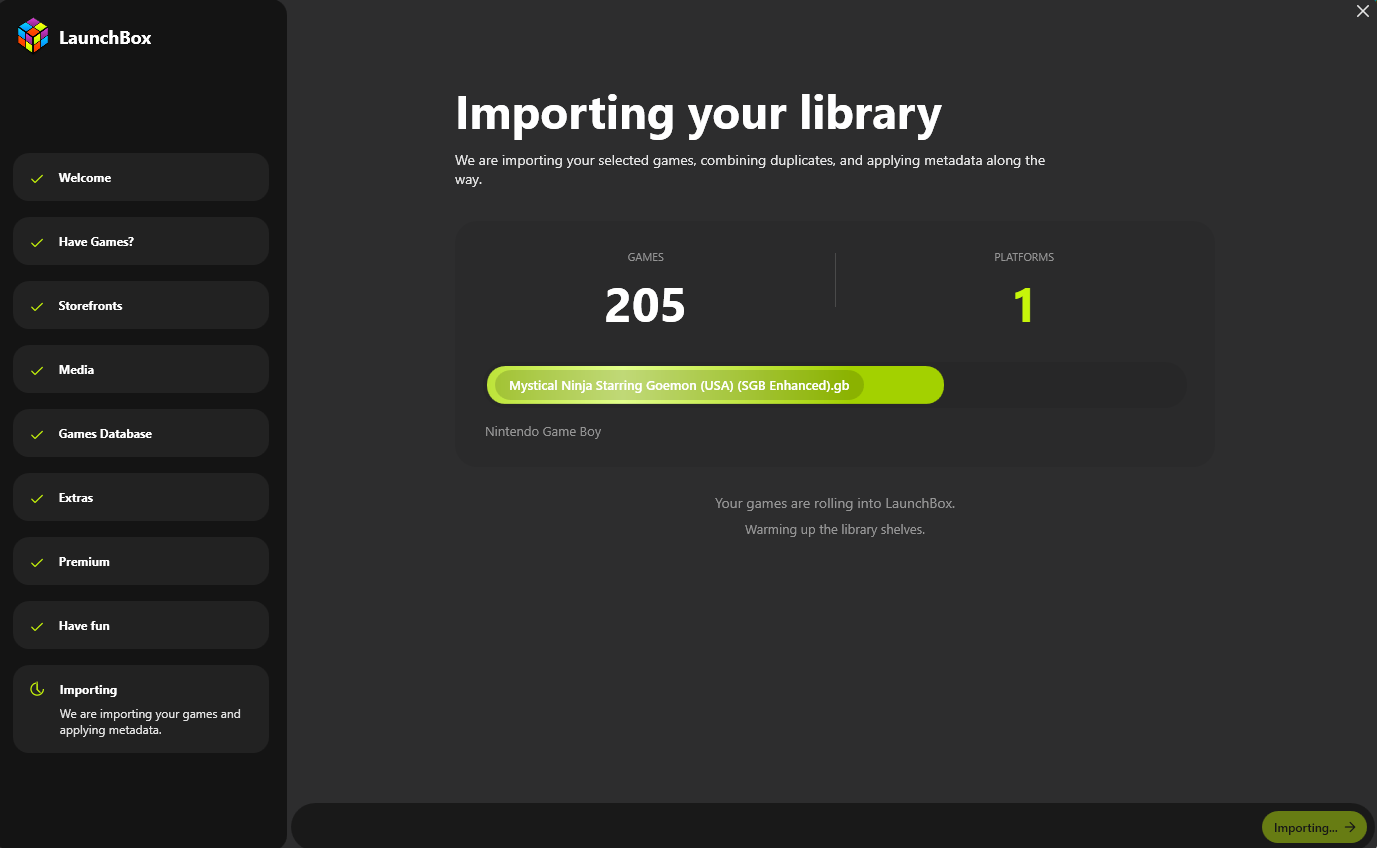
The Welcome Wizard has been overhauled so first-time setup now feels like a guided process where you can see exactly what LaunchBox is doing at every step. No more waiting on a mystery box. Staged progress, clearer status messages, better retry handling, media download limits, and persistent image download queues are all part of the upgrade.
|
|
Several import flows have also been improved: Xbox 360 imports now support default.xex and Games on Demand formats, Ubisoft imports have better filtering and name cleanup, and LaunchBox now uses smarter ROM prioritization when combining multiple versions of the same game.
|
|
|
|
|
|
|
Game Details and Media Feel Faster and More Useful
|
|
Quicker to browse, better at a glance
|
|
Game Details now loads faster, especially on larger libraries or media-heavy setups. Fullscreen image viewing supports pixel-perfect integer scaling and better monitor behavior, so your artwork and screenshots look cleaner when you inspect them up close.
|
|
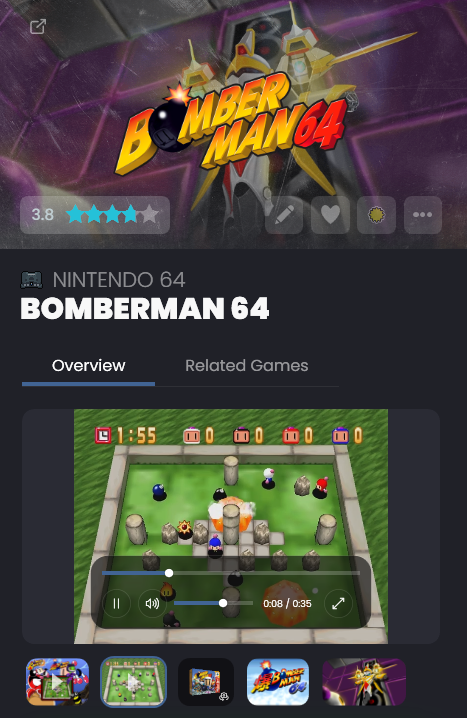
Videos are easier to control too, with new in-app video playback controls so you never have to leave LaunchBox. There's also a new Assume Game Paths Exist preference that helps Game Details and library navigation feel more responsive in certain setups.
|
|
On the media side: Steam trailer downloads are working again after Steam changed how some trailers are delivered. FFMPEG playback is more reliable, rare Big Box video crashes have been fixed, and an issue where auto-play music could lock up the UI after Big Box opened has been resolved.
|
|
|
|
|
|
|
One More Thing: System Tray Support Is Now Free
|
|
LaunchBox learned a new trick: politely getting out of the way
|
|
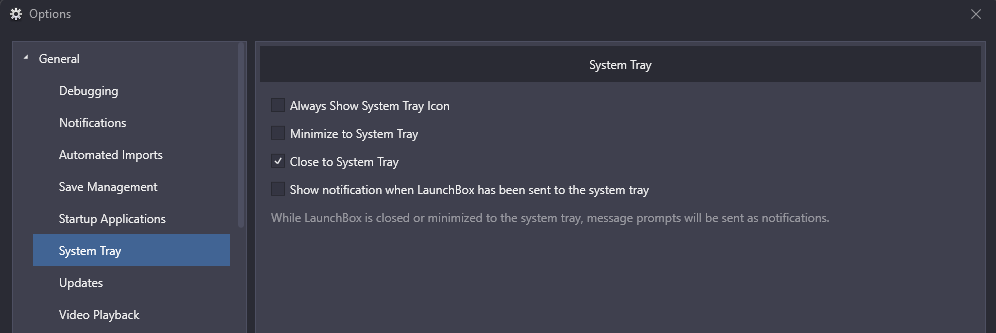
System tray support is now free for all users! For all of you who like keeping LaunchBox running quietly in the background without taking up taskbar space, this one's for you. Find it under Options > System Tray.
|
|
|
|
|
|
|
Feeling curious? Want every last detail?
|
|
|
|
Thanks as always to everyone testing, reporting, suggesting, and helping shape LaunchBox. Updates like this are full of small details that come directly from real-world use, and we're excited to keep building on them.
|
|
Enjoy the update!
|
|
The LaunchBox Team
|
|
|
Big Box
|
|
Looking to show off your game collection? Building an arcade cabinet? Itching to play games on your TV? Big Box will blow you away with its customizable design, allowing you to create an eye-popping, unique setup that is sure to impress.
|
|
|
|
Startup, Shutdown, & Pause Themes
|
|
Get that polished feel while you navigate between your library and games. With full theming support, you can make them look exactly the way you want them to.
|
|
|
|
LaunchBox Custom Themes
|
|
Tired of the same old LaunchBox look? With LaunchBox Premium you can choose from multiple community-created themes or build your very own!
|
|
|
|
Gamepad Automation
|
|
Upgrade your gaming experience by removing the need for a keyboard and mouse. Controller automation features are built into LaunchBox and Big Box.
|
|
|
|
|
|
Happy gaming!
The LaunchBox team
|
|
|
|
|
|
|
|
You received this email because you have indicated an interest in LaunchBox. If you no longer wish to receive these emails, please
|
|
|